How do I get Gelee alerts in Slack?
Checked October 2026
The Gelee team connects Slack for you. Tell us which Slack workspace and channel you want, and we set it up. After that Gelee posts a message when a prospect replies, a call is booked, a campaign pauses or a LinkedIn account disconnects. You can check it any time with the Send Test button.
Before you start
There is no Connect button for Slack in your Gelee settings. The Gelee team connects it for you, usually during onboarding. That way the right channel is picked and the permissions are right the first time.
To get Slack set up, or to change the channel, message your Gelee contact. Say the name of your Slack workspace and the channel where you want the messages.
You will need to be allowed to add apps in your Slack workspace, or ask the person who is. Slack will ask you to allow Gelee when we connect it.
Check that Slack is connected
- Open the Integrations tab
In Gelee, click Settings, then Integrations. Find the Slack card. It shows a small label that says Connected or Not connected.
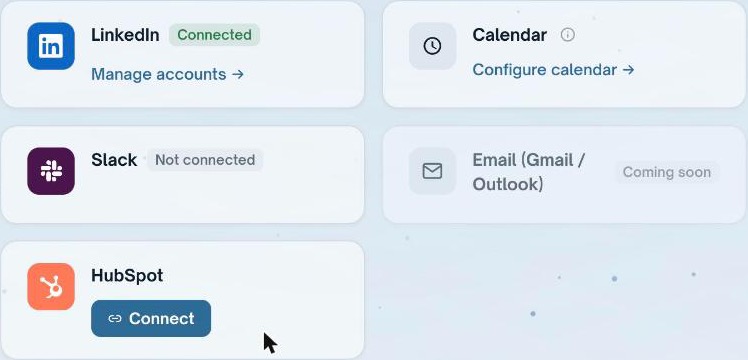
This workspace has no Slack yet, so the label says Not connected. - Read the channel name
When Slack is connected, the card also shows the channel, for example #replies. That is where Gelee posts.
- Click Send Test
A test message lands in the channel within a few seconds. If you see it, you are set. If you do not, look at the section below called If something goes wrong.
What Gelee posts in Slack
Gelee posts a message for each of these. Each one is a short card, so your team can read it at a glance.
- A prospect replied
- Shows who replied, what they said, and a drafted answer for you to approve.
- A reply needs a person
- Gelee was not sure how to answer, so it asks a human. These can ping the whole channel so they do not get missed.
- A call was booked
- Shows the person, the meeting and the time.
- A campaign paused
- Tells you which campaign stopped and why.
- A follow-up is ready
- When a prospect goes quiet, Gelee drafts a follow-up and sends it to Slack for you to approve.
- A LinkedIn account disconnected
- Tells you which account needs to be reconnected so sending can continue.
Approving a message in Slack
Gelee does not send an AI-written message on its own. It posts the draft in Slack and waits. Click Approve to send it.
Approving only sends the message on LinkedIn. It never books or changes anything else.
Two channels instead of one
Some teams want everyday replies in one channel and the urgent ones in another. Gelee can post the needs-attention messages, such as a reply that needs a person, to a second channel. Ask your Gelee contact to set it up.
If something goes wrong
Start with Send Test. It tells you whether Gelee can reach Slack at all.
- The card says Not connected
- Slack has not been set up for your workspace yet. Message your Gelee contact.
- Send Test says it failed
- The Gelee app may have been removed from your Slack, or the channel was deleted or made private. Tell your Gelee contact and we will connect it again.
- I do not see messages in the channel
- Check you are looking at the channel named on the card. Then click Send Test. If the test works but real messages do not, tell us the date of the last reply you expected.
- I want a different channel
- Message your Gelee contact with the new channel name.
How to disconnect
Ask your Gelee contact to disconnect Slack, or remove the Gelee app in your Slack settings. Gelee stops posting straight away. Messages already in Slack stay where they are.
Common questions
Can I connect Slack myself?
Not from the settings page. The Gelee team connects it for you so the channel and permissions are right. Message your Gelee contact.
Which events does Gelee send to Slack?
Replies, replies that need a person, booked calls, paused campaigns, follow-ups that are ready, and LinkedIn accounts that disconnect.
Will Gelee send a message without my approval?
Not for the AI drafts that go to Slack. Gelee posts the draft and waits for you to approve it.
Can the messages go to a private channel?
Yes, as long as the Gelee app is invited to it. Ask your Gelee contact to set it up.
Sources
- Slack: add an app to a channelHow an admin lets an app like Gelee into your workspace.
Keep reading
Gelee finds the buyers, paces the sending under these limits, and drafts the replies.
Book a demo