How do I connect my calendar to Gelee?
Checked October 2026
Open Settings, then Calendar in Gelee, pick your booking tool and click Connect. Cal.com, Calendly, iClosed and Reclaim connect with one click. GoHighLevel needs a token you copy from your own account. Once connected, Gelee knows when a prospect books, reschedules or cancels.
Before you start
You need a login for the booking tool you use. Use the one your prospects actually book on. If you use more than one, connect the main one.
Plan on five minutes. Most tools connect with one click and a sign-in.
Connecting a calendar does not book anything by itself. Gelee only watches for bookings. Automatic booking is a separate switch that is off until you turn it on.
Connect your calendar in three steps
- Open the Calendar tab
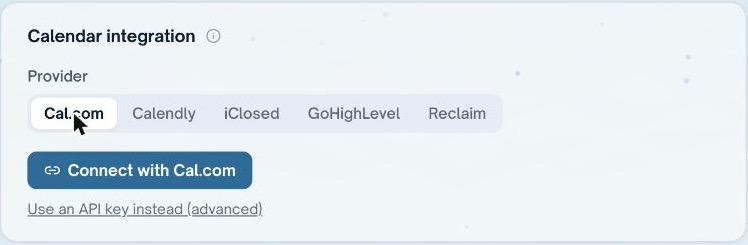
In Gelee, click Settings, then Calendar. You will see five tools in a row: Cal.com, Calendly, iClosed, GoHighLevel and Reclaim.
- Pick your tool and click Connect
Click the name of your booking tool. Click the blue Connect button. Your tool opens in a new window and asks you to allow Gelee. Click Allow. If there is no Connect button, click Use an API key instead and follow the section for your tool below.
- Choose the meeting type and test it
Pick the meeting type that prospects book, such as Intro call. Click Test. Gelee tells you if it can see the calendar. When it says it can, you are done.
Cal.com
Click Connect with Cal.com, sign in, and click Allow. That is all most people need.
If you prefer a key, click Use an API key instead, then paste a key that starts with cal_live_.
To hear about bookings right away, add a webhook. In Cal.com go to Settings, then Developer, then Webhooks, and click New. Gelee shows you the address to paste on the same card. Tick Booking created, Booking rescheduled and Booking canceled.
Calendly
Click Connect with Calendly, sign in, and click Allow.
Calendly does not send Gelee instant alerts, so Gelee checks your calendar about once an hour. A booking can take up to an hour to show up.
iClosed
Click Connect with iClosed, sign in, and click Allow.
If you prefer a key, open iClosed, go to Settings, then Developer, then API Keys, and create one. This needs the Business plan. Paste the key into Gelee.
To hear about bookings right away, add a webhook. In iClosed go to Settings, then Integrations, then Webhooks. Paste the whole address Gelee gives you, including the part after the question mark. Tick the call created, rescheduled and cancelled events.
GoHighLevel
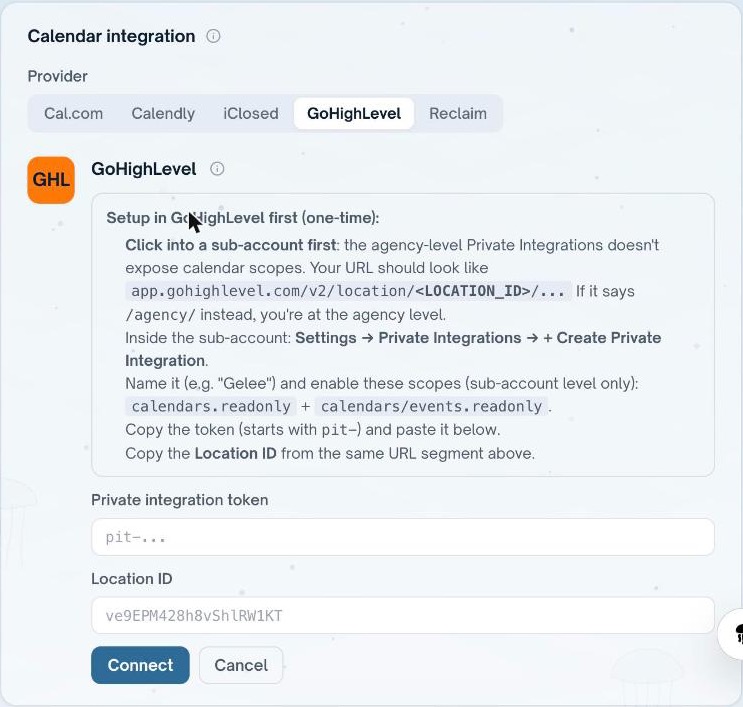
GoHighLevel has no one-click button. You make a token in your own account and paste it into Gelee. The picture shows the form and the steps Gelee prints above it.
Work inside a single sub-account, not at the agency level. The address in your browser should contain the word location. If it says agency, click into a sub-account first.
- Make a Private Integration
In the sub-account, click Settings, then Private Integrations, then Create Private Integration. Name it Gelee.
- Give it two permissions
Tick calendars.readonly and calendars/events.readonly. Gelee only reads your calendar. It never changes it.
- Copy the token and the Location ID
Copy the token. It starts with pit-. Then copy the Location ID from the address in your browser, the text right after location.
- Paste both into Gelee
In Gelee, go to Settings, then Calendar, then GoHighLevel, and click Connect GoHighLevel. Paste the token and the Location ID, click Connect, then pick the calendar prospects book on.
Reclaim
Click Connect with Reclaim, sign in, and click Allow.
If you prefer a key, open Reclaim, go to Settings, then Developer, and create one. It is read-only. Paste it into Gelee.
Reclaim does not send instant alerts, so Gelee checks about once an hour.
Automatic booking
Gelee can book a time for a prospect who has agreed to one. This switch is called Auto-book confirmed times. It is off until you turn it on, and Gelee does not book anything while it is off.
If something goes wrong
Start with the Test button on the Calendar card. It tells you what Gelee can and cannot see.
- There is no Connect button
- Your workspace is not set up for one-click sign-in with that tool yet. Click Use an API key instead.
- A booking is missing
- Calendly and Reclaim are checked about once an hour. Wait an hour. For Cal.com and iClosed, check the webhook is switched on and that all three events are ticked.
- The Test button says it cannot see the calendar
- The key was cut off when you copied it, or it was deleted. Make a new one and paste it again.
- GoHighLevel says it has no calendars
- You made the token at the agency level. Make it again inside a sub-account.
- I connected the wrong tool
- Click Disconnect on the Calendar card, then pick the right tool.
How to disconnect
In Gelee, go to Settings, then Calendar, and click Disconnect. Gelee stops watching your calendar straight away. Nothing in your booking tool changes.
Common questions
Which booking tools does Gelee work with?
Cal.com, Calendly, iClosed, GoHighLevel and Reclaim.
Can I connect more than one calendar?
Connect the one your prospects book on. Gelee tracks bookings from the tool you connect.
Will Gelee change my calendar?
No. Gelee reads bookings. It only books a time for you if you turn on Auto-book confirmed times, which is off by default.
How fast does Gelee see a new booking?
Right away for Cal.com and iClosed when the webhook is on. About once an hour for Calendly and Reclaim.
Sources
- Cal.com: webhooksHow the webhook in the Cal.com section works.
- GoHighLevel: Private IntegrationsHow GoHighLevel makes the token in the GoHighLevel section.
Keep reading
Gelee finds the buyers, paces the sending under these limits, and drafts the replies.
Book a demo