Average LinkedIn connection request acceptance rate is 20 to 30%
Cold B2B LinkedIn invites land 20% to 30%. See why published rates swing from 26% to 88%, what each number actually measures, and what 25% yields per month.
What is the average LinkedIn connection request acceptance rate?
On a cold B2B list, expect 20% to 30%. That is the range we publish from campaigns we run, and it is where most outbound accounts sit. Leadriver puts B2B outbound between 30% and 37% in 2026. Operator targets circulating on LinkedIn call 26% to 30% the industry average and 30% to 40% the goal.
The higher public numbers are almost always a warmer list. A practitioner on r/LinkedInTips reports 65% on his own requests while noting most clients he sees are stuck at 25% to 30%. Mario Martinez Jr wrote up a 74% rate built on people who already knew his name or had engaged with his content first.
If you are sending to strangers who have never seen your face, 25% is a normal Tuesday.

Why do published numbers range from 26% to 88%?
Because they are counting different things. Botdog analysed 16,492 requests and found 88% of accepts happen within seven days. That is a timing figure about people who were going to accept anyway, not the share of requests that get accepted.
Four numbers, four different measurements:
When someone quotes you a rate, ask what the list was.
What does a 25% acceptance rate actually produce?
Roughly 500 invites a month at 25 a day over 20 working days. At 25%, that is 125 new connections. Our first-message reply benchmark is 12% to 18%, so 15 to 22 replies, plus another 6 to 10 from follow-ups. Call it 21 to 32 conversations.
Meetings run 3% to 5% of invites sent, which is 15 to 25 from those 500.
The 25 end only happens when replies get answered the same day. A founder doing outreach between client calls answers on Thursday evening, by which point the prospect has moved on, and the same 500 invites produce 12 meetings instead of 20. The acceptance rate was identical in both cases.
Is a weak acceptance rate the message or the profile?
Usually the profile. LinkedIn shows the recipient your photo, headline and mutual connections in the invite. On mobile the note is often collapsed behind a tap. So the decision gets made on your headline before anyone reads the sentence you spent twenty minutes on.
Things that move the accept, roughly in order:
1. Whether the list is actually your buyer.
2. Headline and photo.
3. Shared connections and shared groups.
4. Whether you have posted anything in the last month.
5. The note itself.
If yours reads "CEO | Founder | Helping businesses scale", that is the first fix, and the LinkedIn headline rewriter takes about a minute.
How many invites can I send before the rate drops?
LinkedIn does not publish a daily limit, and what holds moves with account age, how old the profile is and how people respond to you. We run 20 to 25 a day on a warm account and 5 to 10 a day on a new one for the first two weeks. A common weekly benchmark is 150 to 200 connections.
Sending 100 in an afternoon on a two-month-old account is how people end up with a restriction and a 9% acceptance rate. Withdraw pending invites older than three weeks too. A pile of 600 ignored requests sitting in your sent folder is itself a signal, and it caps how many new ones you can send.

What counts as a good, average and poor acceptance rate?
Under 15% means the list or the profile is wrong and more volume will not fix it. 20% to 30% is normal cold outbound. Above 40% almost always means warmth somewhere: content, mutuals, an event, or a list of people who already follow you.
| Acceptance rate | What it usually means | What to change first |
|---|---|---|
| Under 15% | Wrong list, or a profile with no photo and a vague headline | Rebuild the list before touching the note |
| 15% to 20% | Right industry, wrong seniority or wrong country | Tighten the filter to one title and one region |
| 20% to 30% | Normal cold outbound, working as designed | Nothing. Work on reply rate instead |
| 30% to 40% | Good list plus visible activity on your profile | Raise volume slowly, 5 more invites a day per week |
| Over 50% | Warm list, or you are targeting people who accept everyone | Check whether replies follow. Often they do not |
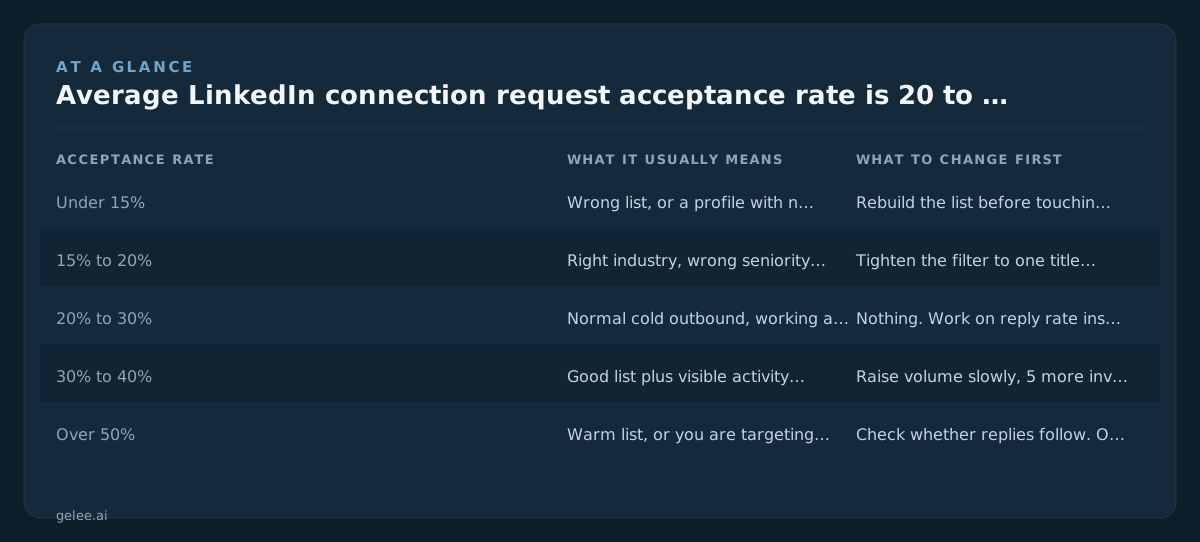
That last row is the one people miss. Recruiters, open networkers and job seekers accept almost everything, which flatters the number and produces nothing.
Are acceptance rates falling?
Yes, slowly, and the reason is volume. The same filters get exported by everyone selling to the same list, so a VP of Engineering at a 200-person SaaS company now gets six or seven invites a week from vendors. People who accepted in 2021 at 40% now sit at 25%.
That does not mean the channel stopped working, and we went through the arithmetic in cold outbound isn't dead in 2026, it just got harder. It means the gap between a list built by hand and a list exported in ten seconds got much wider.
How do I raise my acceptance rate?
Warm the list before you touch it. People accept invites from a face they have seen or a name they recognise. On accounts we run, the biggest movers are engaging with two of a prospect's posts first, cutting the list to one job title, and posting twice a week so the profile is not empty when they click.
Five changes, in the order we make them:
Gelee has a Post Commenters preset that watches a post, DMs everyone who comments, and replies publicly once the DM is confirmed sent. Those people raised their hand, so they accept at well above the 20% to 30% cold band. The mechanics differ from Instagram in ways worth knowing, which we covered in comment-to-DM on Instagram vs LinkedIn.
Should you optimise for acceptance rate at all?
Only up to a point. A 55% rate on a list of open networkers produces fewer meetings than 22% on 300 hand-picked buyers. Acceptance is a diagnostic for list quality and profile quality. Meetings booked is the number that pays, and ours run 3% to 5% of invites sent.
If you send 30 invites a week and answer replies yourself, you do not need software. Your rate is what it is, and a better headline plus a tighter list will move it more than any tool. Gelee has no self-serve signup, setup runs about 15 minutes with us, and pricing is shared on a demo call. It makes sense when you are running 500 or more invites a month, or several client accounts at once, which we break down in running Gelee across multiple client LinkedIn accounts safely.