How Many LinkedIn Connection Requests You Can Send Per Day
Twenty to twenty-five invites a day on an established account, five to ten on a new one. LinkedIn caps invites weekly, so here is how to stay under it safely.
How many connection requests can you send on LinkedIn per day?
Twenty to twenty-five a day on an established account, and five to ten a day on one that is less than a month old. LinkedIn enforces a weekly ceiling rather than a daily one, and most accounts hit it somewhere between 100 and 200 invites per week. Twenty a day, five days a week, keeps you inside it.
Those are our numbers from running LinkedIn outbound as the only channel. The public estimates land in the same place. LeadLoft puts the range at 100 to 200 requests per week, or about 15 to 30 per day. Evaboot says roughly 20 per day and points out the same thing, that the cap is weekly and the daily figure is just arithmetic. Expandi advises staying within 100 invitations a week, which is the most conservative of the three and the one to follow if your account is new.

Does LinkedIn actually publish a daily limit?
No. LinkedIn has never printed a number for daily or weekly invitations, which is why the answer changes depending on who you ask. The limit moves with account age, how complete your profile is, how often you post, and above all how people respond to your invites. Two accounts sending the same volume get treated differently.
The signal LinkedIn watches most closely is what happens to the invite after you send it. Accepted, ignored, or marked "I don't know this person" are three different outcomes, and the third one is expensive. If your accept rate sits in the 20 to 30% range we see across campaigns, you are targeting well enough that volume is rarely the problem. If it is under 10%, cutting your daily number will not fix it. Your targeting will.
How many invites can a brand new account send?
Five to ten a day for the first two to four weeks, then step up. An account created last Tuesday with a stock headline, no posts and forty connections that starts firing off 25 invites a day is the exact pattern LinkedIn restricts. Ramp slowly and the ceiling rises on its own.
| Account state | Safe invites per day | Invites per month (22 days) | Meetings at 3-5% |
|---|---|---|---|
| New, under 30 days | 5-10 | 110-220 | 3 to 11 |
| Warming, 1-3 months | 10-20 | 220-440 | 7 to 22 |
| Warm, established | 20-25 | 440-550 | 13 to 27 |
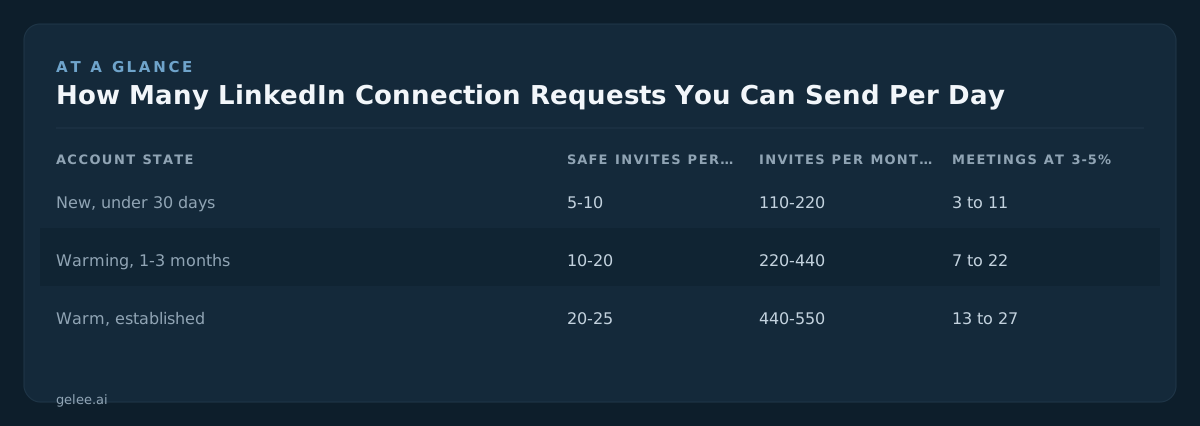
A ramp that works looks like this: five a day for week one, ten for week two, fifteen for week three, twenty from week four. Post twice a week while you do it, so the account is producing something other than invitations, and best time to post will tell you when your audience is actually online.
The ramp is worth doing properly because the cost of getting it wrong is a week of nothing. A restricted account cannot send invites at all until the warning clears, so a seven day restriction on a 20-a-day account costs you 140 invites and roughly four to seven meetings.
What happens when you hit the limit?
You get an "invitation limit reached" message and sending stops until the week rolls over. That is the mild version. The harsher one is a temporary restriction triggered by too many ignored invites or too many "I don't know this person" reports, which pauses invitations for days and sometimes puts the account into review.
Hitting the weekly ceiling by itself does no damage. You just wait. What causes real trouble is the combination of high volume and low acceptance, because that looks like spraying. If you are sending 25 a day and 6 people accept, you are at 24% and fine. If you are sending 25 a day and 2 accept, you are at 8% and more volume digs the hole deeper. That is usually the moment to rewrite the headline before touching the send schedule, and the LinkedIn headline rewriter is free.
Do Premium or Sales Navigator accounts get to send more?
Not meaningfully. Premium and Sales Navigator buy you better search, more InMail credits and profile views, but the invitation ceiling is tied to account behaviour rather than to your subscription tier. A Sales Navigator seat with a two week old profile still gets throttled at the same point a free account does.
One genuine difference in the free tier is the personalised note. LinkedIn's own help page states that basic and free members can add a message to five connection requests per month. Five. If you are on a free account and your entire strategy is a clever personalised invite note, you get five shots every thirty days and then you are sending blank invites like everyone else.
Blank invites still work. Our accept rates in the 20 to 30% band include plenty of no-note sends, because what people read before accepting is your headline and your most recent post, not a 280 character pitch.

How many connection requests do you need to book one meeting?
Between 20 and 33, at our published rates. Out of 100 invites, 20 to 30 get accepted. Of those, 12 to 18% reply to the first message and another 5 to 8% reply to a follow-up. That produces 3 to 5 meetings per 100 invites sent.
Run it forward for one person. A founder sending 20 invites a day, 22 working days a month, sends 440 invites. At 25% acceptance that is 110 new connections. At 15% first-message reply that is around 16 conversations, plus another handful from follow-ups. At 3 to 5% of invites, 13 to 22 meetings land on the calendar.
The part nobody prices is the middle. Those 110 connections produce 20 to 25 conversations a month, and every one needs a reply within a few hours to stay alive. Twenty minutes per thread across its life is roughly eight hours, and the writing, list building and chasing on top takes that past 20 hours. At $100 an hour it is $2,000 of your time on top of whatever your tool charges.
Can you send more by running multiple accounts?
Yes, and it is the only way past the ceiling that does not involve breaking rules. Three warm accounts at 20 invites a day is 60 a day and roughly 1,320 a month, with each individual account sitting inside its own safe range. The limit is per account, so more accounts is more capacity.
Capacity arrives late, though. Every new account starts at 5 to 10 invites a day, so a third sender added in January is not running at 20 a day until the back half of February. Budget a month of warm-up per account before you count its volume.
What multiplies is the reply load, not just the sending. Three accounts at 25% acceptance produce around 330 new connections a month and 60 to 75 live conversations. At 20 minutes each that is 23 hours, which at $100 an hour is $2,300 of your own time before anyone has written a proposal.
Should you try to bypass the limit?
No. Scrapers and headless browser tricks that promise 100 invites a day work until the account is restricted, and a restricted account with 4,000 connections built over three years is not something you can repurchase. Most of those tools are selling you the same weekly ceiling with more risk attached to it.
If you are sending 100 invites a week and booking nothing, 300 a week books nothing three times faster. Founders with a decent following get more out of turning post comments into DMs, because a comment is a person who already raised their hand and a DM to an existing connection does not touch the invite allowance at all. The same applies to delivering a lead magnet in the comments rather than the post.
Is a higher daily send rate worth paying for?
If you already have someone answering replies, no. Buy them a sending tool like Expandi and keep the rest of the money. Gelee is built for the founder who has 440 invites a month going out and nobody to work the 20-odd conversations that come back. There is no self-serve signup, so it starts with a call.
It is the wrong purchase in two cases. If your accept rate is under 10%, fix targeting and your profile first, because automating a bad list gets you restricted faster than it gets you meetings. If your average deal is under $2,000, 15 meetings a month is not enough revenue to justify anything beyond doing it yourself for an hour a day. Setup takes 15 minutes and pricing is shared on a demo call.